
Article reference KA-01954
Applicable to models: Dimplex Hub, Dimplex Control App
Check the RFM is installed correctly by going to the settings menu for your product. Check your product’s manual for instruction of how to do this.
If RFM is enabled in the settings menu, check your heater’s ‘info’ screen if available (refer to product’s manual).
If RFM is enabled and does not show in the product’s info screen or isn’t connectable via the Dimplex Control app, remove the RFM, check that the connectors are clean and re-insert it.
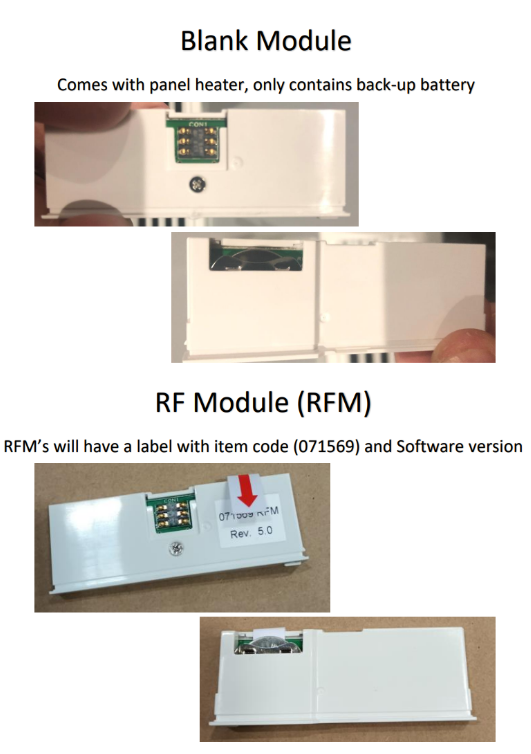
If this didn’t resolve the issue, check the RFM has a label that says RFM. If it doesn’t it might be the blank that the heater came with – looks a lot like the RFM. Power back up after re-inserting and try to enable again.
Try adding the appliance to the app again. Ensure the appliance is within RF range of the Hub by moving the Hub closer if need be.
Photo below showing difference between blank module & RF Module -
If still experiencing an issue, raise a ticket see additional help link below -