
Article reference KA-02470
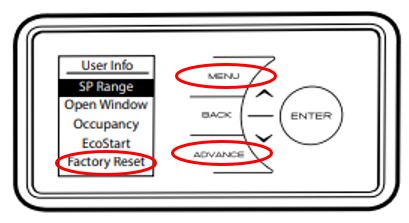
To navigate to the Advanced settings menu, from the home screen:
Press and hold Advance and Menu buttons for 5 seconds.
Applicable Models:
QRAD050E, QRAD075E, QRAD100E, QRAD150E, QRAD200E
Related to your product and enquiry. Links open in a new tab.
Article reference KA-02470
To navigate to the Advanced settings menu, from the home screen:
Press and hold Advance and Menu buttons for 5 seconds.
Applicable Models:
QRAD050E, QRAD075E, QRAD100E, QRAD150E, QRAD200E
Need more help? Contact our support team
Great, glad that helped. Thanks for letting us know.
Sorry this didn’t solve it. Our support team can take a closer look. We’ll include article KA-02470 so you don’t have to repeat yourself.