
Article reference KA-02451
Factory Reset
In order to carry out a factory reset on your Series B or C PLX_E panel heater, you will need to carry out the following:
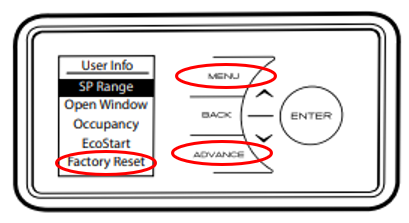
1) Press and Hold Advance and Menu buttons for 5 seconds.
2) Highlight Factory Reset and press Enter.
3) On the Are you sure? screen, highlight Yes and press Enter
The control will then perform a power on sequence and self test before it takes you through the setup steps:
1) DST Rule - Daylight Savings Time - Select UK/Ireland
2) Date and Time entry
3) Sound - Enable or Disable the audible beep on button presses
The control will now be reset to factory defaults and ready to use
Applicable Models:
PLX050E, PLX075E, PLX100E, PLX125E, PLX150E, PLX200E