
Article reference KA-02452
Factory reset
To carry out a factory reset on the PLX-E panel heater, you will need to do the following:
- Press and Hold 'Enter' for 5 seconds to display the User Interface Menu.
- Scroll down and select 'Factory Reset'.
Series A: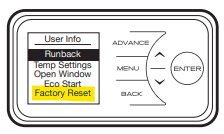
Applicable Models:
PLX050E, PLX075E, PLX100E, PLX125E, PLX150E, PLX200E, PLXC300E