
Article reference KA-01734
This product is fitted with a replaceable battery in the controls. To replace the battery, follow the steps below.
1. IMPORTANT: Before replacing the battery ensure the heater is isolated from the electricity supply.
2. Unscrew the cover of the user interface and pivot away from the housing. Set the cover and the screw safely to one side.
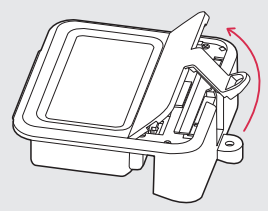
3. Slide the catch and pull the module up from the User Interface
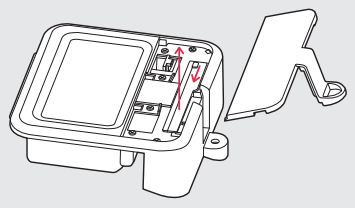
4. Move the module clear of the User Interface to access the battery
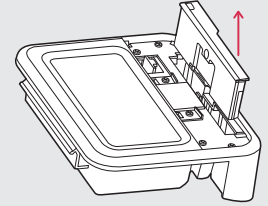
5. Remove the coin cell battery and replace. A CR2032 3.3V coin cell battery is required.
These can be purchased online & from high street stores (ie Amazon, Halfords etc will sell CR2032 batteries).
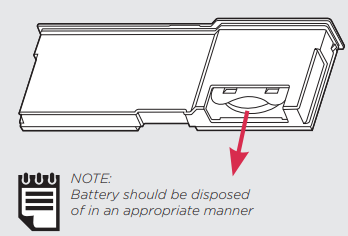
6. Slide the module back into the User Interface, ensuring the catch in engaged
7. Replace the cover and secure using the screw
Power on the heater an enter the current Date & Time. The heater should now remember this if the heater is disconnected from the mains supply.
Applicable to models:
XLE050 XLE070 XLE100 XLE125 XLE150
TSRE050 TSRE070 TSRE100 TSRE125 TSRE150
NLSH050 NLSH070 NLSH100 NLSH100 NLSH125 NLSH150
DESE050 DESE070 DESE100 DESE125 DESE150
SSHE050 SSHE070 SSHE100 SSHE125 SSHE150
VASH050E VASH070E VASH100E VASH125E VASH150E AC6550 AC6554