
Article reference KA-01166
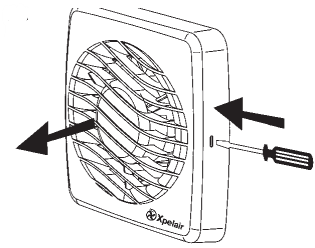
Remove the front cover by pressing the release catches located on the either side of the fan, with the likes of an electrical screwdriver, whilst pulling the front cover forward.
Applicable Models:
DX Range - DX100 DX100B DX100BHPT DX100BHT DX100BT DX100HTA DX100HTAP DX100PC DX100PIR DX100T DX100TCP
VX-SP Range - VX100-SP VX100T-SP VX100P-SP
LV Range - LV100T LV100HTA LV100HTAP