
Article reference KA-01144

1 – *IMPORTANT* Make sure the product is turned off at the isolation switch
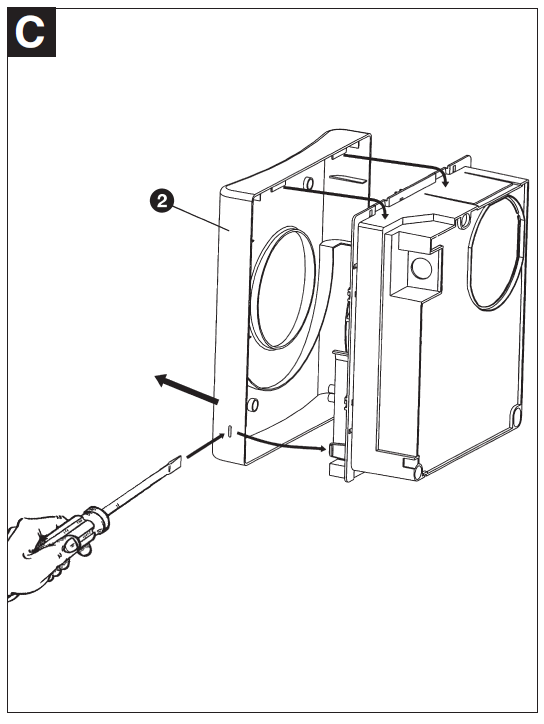
2 – Remove the front cover by pressing in the 2 plastic tabs at the side with a flat ended screw driver, then gently pull the bottom of the cover forward. When the bottom is free the top can be unhooked from the tabs by lifting it up.
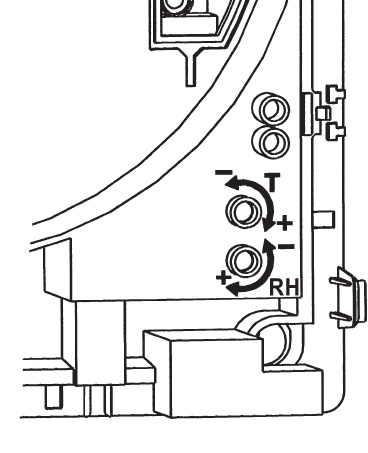
3 – The adjustment dials for the timer and the humidistat can be found in the bottom right hand corner of the product, and can be adjusted using a small flat ended screw driver
Applicable Models
Current Premier Centrifugal Range – CF20TX
Current Low Voltage Premier Centrifugal Range – LVCF20TX
Obsolete Premier Centrifugal Range – DX200, DX200T, CF20, CF20T, CF20W, CF20WT, DX180, DX180H, DX180T
Obsolete Low Voltage Premier Centrifugal Range – LVDX200T, LVCF20, LVCF20T, LVCF20W, LVCF20WT
Premier High Pressure Range – DX400DC, DX400TDC, DX400PCDC, CF40DC, CF40TDDC, CF40RSTDDC, CF40DCRSTD, DX400, CF40, DX400T, CF40DC, CF40RSTD, CF40TD, CF40TDDC, DX400PC, DX400RS, DX400T,