
Article reference KA-02354

UI= User interface
CC= Charge Controller
Series A - F
You need to change both UI & CC as the QMKIT1 (part number X-03/82985/0SP) so the software matches.
You cannot change just the CC or UI on its own.
Series G
You need to change both UI & CC as the QMKIT2 (part number X-03/82986/0SP) so the software matches.
You cannot change just the CC or UI on its own.
Series G5 / G6 / G7 / G8 / G9/ G10 / G12 / G13 / G14, Z & Y
You can change the UI on its own as long as the CC already says CC20 or CC:02 on screen:
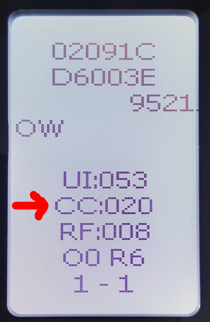 If the CC shows CC:19 then it should be replaced by CC:20 (or CC:02) when changing the User Interface.
CC is part number 100000038
QM050RF User Interface = 300004431
QM070RF User Interface = 300004432
QM100RF User Interface = 300004433
QM125RF User Interface = 300004434
QM150RF User Interface = 300004435
Series G11 only
If you are changing the User Interface on a Series G11, you can leave the CC in place as it will already be on CC:20, but you MUST also change the fan X-02/80017/0SP and remove any fan speed dropper resistor which was in circuit.
CC is part number 100000038
QM050RF User Interface = 300004431
QM070RF User Interface = 300004432
QM100RF User Interface = 300004433
QM125RF User Interface = 300004434
QM150RF User Interface = 300004435
If changing the CC, but not the User Interface, the fan & resistor can remain in situ.
Applicable Models:
QM050 QM070 QM100 QM125 QM150 QM050RF QM070RF QM100RF QM125RF QM150RF